
Build, Deploy, and Scale AI Agents Across Your Entire Enterprise with Creatio AI Studio
-
 By
William Jepma
, Writer, Editor, and Analyst at Solutions Review
By
William Jepma
, Writer, Editor, and Analyst at Solutions Review - Best Practices,
The Solutions Review team continues to explore Creatio’s solution suite with an overview of the Creatio AI Studio, an AI-native platform built to manage enterprise agent lifecycles.
Enterprise AI agent programs won’t succeed just by running a compelling proof of concept or pilot. Programs fail when a promising pilot must subsequently operate across production systems, business channels, data environments, approval requirements, and security controls. The real enterprise challenge is operationalizing agents at scale without creating an opaque collection of disconnected automations.
Creatio AI Studio is addressing that challenge with a unified environment for building, deploying, operating, and governing AI agents. By bringing agent design, execution, integrations, monitoring, and policy controls into Creatio, teams are positioning their AI agents as managed components of enterprise operations. For organizations evaluating agent platforms, the lifecycle emphasis matters more than any individual model feature.
With that in mind, the Solutions Review editors are outlining how Creatio AI Studio is helping businesses across markets develop, deploy, and scale AI agents throughout their organizations.
What Creatio AI Studio Does
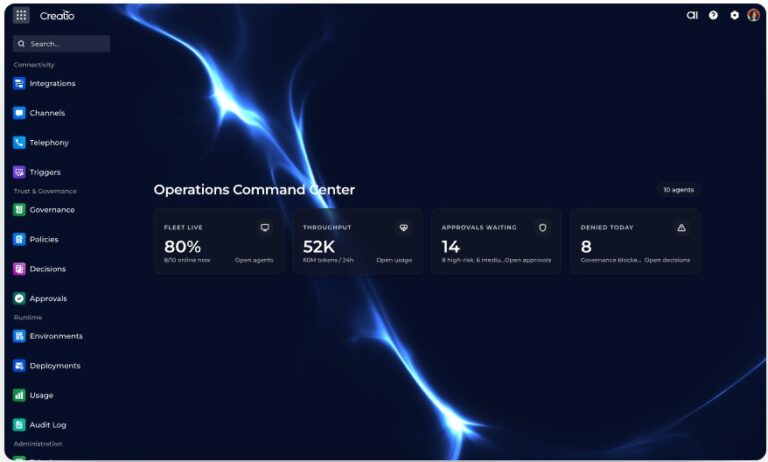
An overview of the platform is the best place to start. Launched earlier in 2026, Creatio AI Studio is an AI-native environment for creating and operating agents across business processes. It supports agent development ranging from natural-language configuration to visual workflow orchestration and programmatic development, while ensuring human users retain consistent, centralized visibility into how agents behave in production.
The platform’s strategic value comes from unifying four requirements that are often fragmented across separate products:
- Agent design: Business users, process owners, and developers can use different creation methods suited to their level of technical expertise.
- Execution: Agents can reason, retrieve knowledge, invoke tools, trigger workflows, and participate in coordinated multi-agent structures.
- Connectivity: APIs, webhooks, and Model Context Protocol (MCP) integrations enable agents to connect to systems, data, and external services.
- Governance: Central dashboards, policy controls, role-based permissions, approval steps, evaluation capabilities, logs, and audit trails provide operational control.
This design is especially relevant for enterprises that need their agents to spread across sales, marketing, service, operations, and internal support. A company needs a repeatable operating model that supports multiple agents with different ownership, complexity, data access, and risk profiles.
Creatio also positions AI Studio as an LLM-agnostic solution. For example, its Prompt Agent Designer feature supports several providers, including Anthropic Claude, OpenAI, and Google Gemini, with per-agent controls such as temperature and other model-specific parameters. That flexibility can reduce the architectural cost of changing providers and make it simpler for teams to test models for different tasks, or adapt to future model availability and policy requirements.
Three Agent-Building Paths
The platform’s three design environments reflect a practical truth: process expertise and software engineering expertise often sit with different people. A credible enterprise AI platform must accommodate both without forcing every use case into either a simplistic prompt interface or a developer-only framework.
Prompt Agent Designer
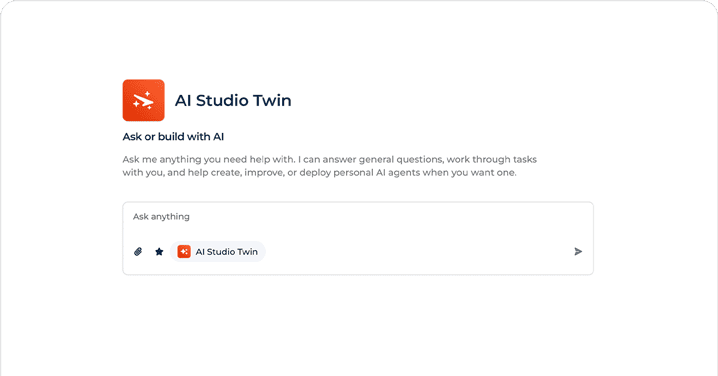
Prompt Agent Designer targets rapid, no-code agent creation. Teams define an agent’s role, behavioral constraints, communication style, and initial message behavior using instructions written in natural language. Users can configure an inline prompt for a single task or connect an agent to a reusable platform prompt that keeps behavior consistent across agents and use cases.
The important enterprise capability is extensibility. Prompt agents can use predefined skills, invoke APIs and workflows as tools, and access knowledge from CRM data, documents, repositories, or external sources. These capabilities are available during runtime, placing prompt-built agents in the same operating environment as more advanced implementations.
That avoids a common governance problem: a no-code agent builder that accelerates experimentation but cannot safely access enterprise systems or be governed alongside production-grade automations.
Workflow Agent Designer
Workflow Agent Designer is the more disciplined option for processes that require explicit sequencing, predictable branching, human approvals, or auditable execution paths. It combines deterministic process controls with AI-driven reasoning, classification, and generation steps on a visual canvas.
Available workflow components include conditional logic, tool calls, wait states, timing controls, loops, parallel paths, code blocks, approval gates, and structured data handling across steps. Agents can be triggered manually, on a schedule, or by events in connected systems.
This is arguably the platform’s most consequential design layer for enterprise use cases. Many business processes cannot responsibly rely on unconstrained agent behavior. Workflow boundaries allow an organization to specify where AI can exercise judgment, where conventional logic should control execution, and where a person must approve an action.
Creatio also supports bidirectional interaction between agents and workflows. A workflow can call an agent for a decision or generation task, while an agent can initiate a workflow to perform structured operational actions. That model supports autonomy within defined process boundaries, which is more operationally useful than treating every agent as a free-form chatbot.
Code Agent Designer
Code Agent Designer extends AI Studio to professional developers and AI coding tools. Creatio describes the feature as having deep awareness of platform structures, including Freedom UI components, data models, workflow definitions, and application metadata.
The platform supports tools such as Claude Code, Codex, and Cursor for generating application logic, modifying workflows and UI components, and prototyping agents. Developers can work programmatically while business users continue to use visual tooling within the same platform environment.
That shared environment is, in principle, a major differentiator. Enterprise agent programs become harder to govern when code-based agents, workflow automations, and prompt-based assistants each exist in separate technical estates. Centralizing these methods should improve discoverability, auditability, reuse, and lifecycle management.
Deployment and Integration
An enterprise agent is only as useful as its ability to act where users work and draw context from systems of record. Creatio AI Studio supports deployment across web chat, email, SMS, Facebook Messenger, Instagram Direct, Microsoft Teams, Slack, and voice calls. The platform manages channel routing and agent assignments centrally.
This breadth matters because customer and employee journeys cross channels. A service agent that works only in a web widget provides limited strategic value if the customer conversation shifts to email, messaging, or voice. Central channel management also creates a more consistent basis for applying policies, routing logic, monitoring, and escalation procedures.
On connectivity, Creatio supports APIs, webhooks, and MCP. MCP is particularly notable because it has emerged as a key approach to interoperability for connecting AI systems to external tools and contextual data. With MCP, Creatio is aligning its agent integration model with an ecosystem that reaches beyond proprietary connectors.
Governance Is the Core Test
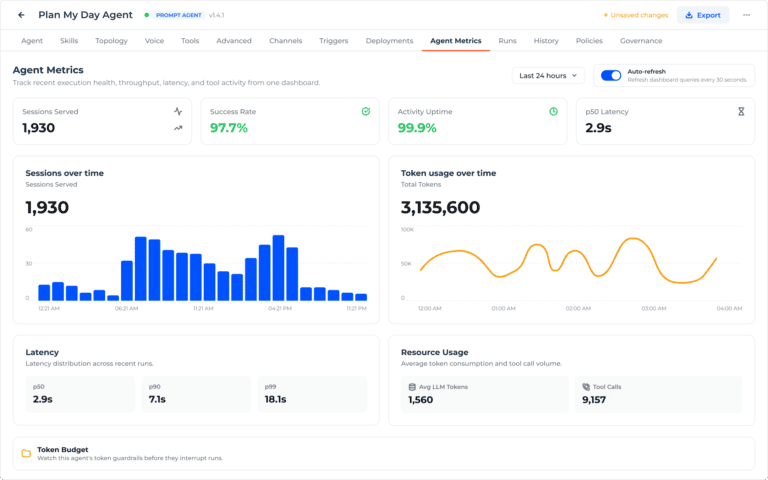
The most valuable feature set in an enterprise agent platform is rarely the most visible one in a demonstration. Agent building tools are increasingly common. What separates a controlled production deployment from a pilot is the ability to understand, constrain, review, and improve agent actions at scale.
Creatio AI Studio includes a central governance dashboard that provides real-time visibility into agent activity, actions, policy triggers, and outcomes. It also maintains a full audit trail for compliance and debugging. These capabilities are essential when agents interact with sensitive data, perform system actions, or influence customer and employee experiences.
Governance controls include:
- Role-based permissions that define who can view, run, or modify an agent.
- Policies for data access, execution limits, and compliance requirements.
- Approval steps and escalation paths for sensitive actions or circumstances outside standard rules.
- Governance analytics, AI observability, and per-agent token cost monitoring for agents generating high volumes of policy triggers or approval requests.
- Evaluation tools for tracking error patterns, success rates, usage trends, and the effects of operational changes.
The approval model deserves special attention. Enterprises should avoid treating human oversight as a binary choice between total manual review and total agent autonomy. The stronger design is selective intervention: automate low-risk, repeatable steps; require approval for material decisions; and define escalation paths for ambiguous or high-impact situations.
Creatio’s Workflow Agent Designer supports human-in-the-loop approval gates, allowing a person to review and authorize an action before the process proceeds. That capability gives organizations a direct mechanism for calibrating autonomy to risk. For regulated industries, high-value customer interactions, financial actions, sensitive data access, and irreversible system changes, such controls should be viewed as baseline requirements.
FAQ
What is Creatio AI Studio? Creatio AI Studio is a unified Creatio environment for building, deploying, operating, connecting, and governing AI agents across business processes.
What are the three ways to build an agent? Creatio provides Prompt Agent Designer for natural-language, no-code configuration; Workflow Agent Designer for visual, multi-step process automation; and Code Agent Designer for programmatic development.
Which models does Creatio AI Studio support? Prompt Agent Designer supports multiple LLM providers, including Anthropic Claude, OpenAI, and Google Gemini, with configurable model behavior at the agent level.
How does Creatio govern AI agents? The platform provides centralized governance dashboards, audit trails, role-based permissions, policies, approval steps, escalation paths, decision-hotspot visibility, and evaluation tools for performance and error analysis.
How do agents connect to external systems? Creatio AI Studio supports APIs, webhooks, and MCP to connect agents with enterprise data, CRM systems, workflows, tools, and external services.
What should an enterprise validate before adopting the platform? Validate channel support, model-provider options, integration security, policy enforcement, audit requirements, data-access controls, available features in the current release, and the production readiness of preview capabilities such as Code Agent Designer.
Get a first-hand look at how the Creatio AI Studio streamlines management of the end-to-end enterprise agent lifecycle.
This article was developed in collaboration with Creatio.
William Jepma
Writer, Editor, and Analyst
William Jepma is an editor and analyst at Solutions Review who aims to keep readers across industries informed and excited about the newest developments in the worktech, marketing, cybersecurity, and broader enterprise technology and AI categories. You can connect with him on LinkedIn or reach him via email at wjepma@solutionsreview.com.
- Top MarTech News From the Week of October 16th: Updates from Seismic, CallMiner, Contentsquare, and More - October 16, 2026
- Top MarTech News From the Week of October 9th: Updates from Algolia, Validity, Acoustic, and More - October 9, 2026
- Solutions Review Brings Its Listicle Authority to Video, Starting With AI-Native CRM - October 6, 2026